Accéder au contenu principal

Bluetooth usage that could help in disaster situations


Bluetooth usage that could help in disaster situations

I read a tweet about communication protocols that could be used in a disaster. Then I asked myself how existing technologies could help.

As a disclaimer, I’m not a first responder or a disaster expert of any kind. Just an engineer trying to propose ideas to help.


Many Bluetooth tracker devices broadcast their information for days, even years. These trackers can be keychains, wristbands, or watches. Some publicly advertise their data in a way that can be interpreted easily.

In an earthquake situation, first responders could use Bluetooth scanners to detect if there are devices nearby and identify personal devices among them.


Thanks to the received signal strength indicator (RSSI), they can have a rough idea of the distance and get closer to the device.


Here is a screenshot from the free nRF Connect app while scanning for Bluetooth devices in the neighborhood:
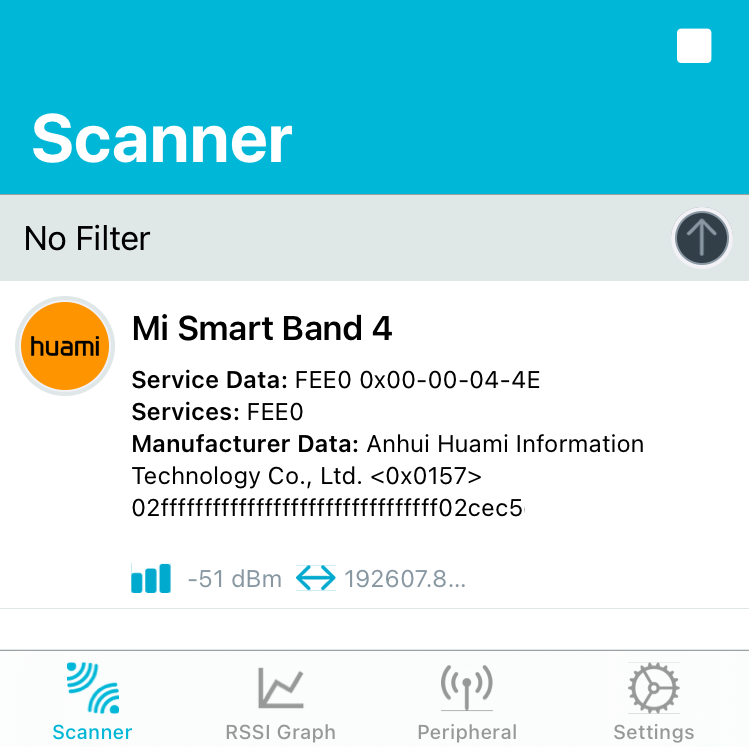

You can see that the smartphone discovered a personal fitness tracker and gives an idea of the distance through the signal strength (-51 dBm, which is quite close).


Several apps propose to find Bluetooth devices with a localization view like the one below, helping identify and get closer to a device.
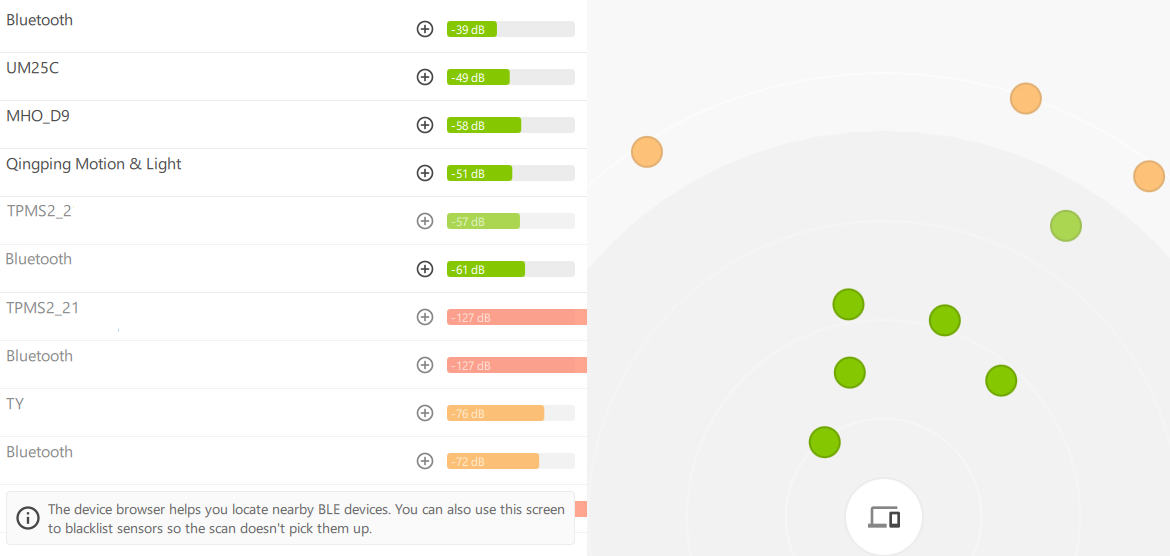

Device browser of the Theengs App


Furthermore, some of these devices broadcast data such as the person’s heart rate or steps, which could give meaningful information to first responders.


We could also imagine that an emergency mode of a personal tracker could trigger a broadcast of more data, like the person’s GPS location, or make encrypted data easily accessible.


One would say that the range of Bluetooth transmissions does not fit such use cases. The examples above are extracts from already available applications without any optimization for this usage. We could imagine using a directional antenna on the receiver side and dedicated software to process and analyze the data.


Finally, the person’s smartphone could be detected, as cleverly detailed in this study.


If you are interested or have any questions about this approach, feel free to message me.


Commentaires

Posts les plus consultés de ce blog

433toMQTTto433 - Bidirectional ESP8266 NodeMCU gateway between RF 433Mhz signal and MQTT

The goal  is to act as a gateway between 433Mhz sensors and a MQTT broker or between the MQTT broker and 433Mhz actuators, It enables to: receive MQTT data from a topic and send RF 433Mhz signal corresponding to the received MQTT data  publish MQTT data to a different topic related to received 433Mhz signal  It can be an interesting part in an home automation system so as to interface sensors and actuators (wall sockets) with software like openhab . List of compatible sensors here The interest of putting this gateway to an ESP8266 and not on a raspberry pi is to be able to manage security actions at gateway level (power on a siren, cut power to certain devices) following RF data received by sensors without being dependent to the PI for security related actions. [EDIT] all infos are now centralized into  the github repository  take a look at it you will find up to date info about OpenMQTTGateway You need: Software: Mosquitto Arduino IDE latest versio...

Get your BLE sensors data into Home Assistant in 5 minutes

You can now upload your board directly from the web browser!  So let's imagine you want to read data from a sensor like a Mi Flora, an LYWSD03MMC, a weight scale, or any other BLE sensor from this list  Plug an ESP32 dev board to your computer USB port Go to this website: https://docs.openmqttgateway.com/upload/web-install.html Select esp32dev-ble Click the install button Depending on your board you may have to press the BOOT button Choose the port that the ESP is connected to. Wait until the process is complete. Release the BOOT button That's it, OMG is now loaded into your ESP32 board without Arduino IDE, platformIO or a binary flasher. Here are the steps in images: Now comes the Home Assistant part: Add the MQTT integration and activate auto discovery Create a user and a password (Configuration->Users) without administrator right for the gateway Well, this is enough for Home Assistant. So let's now connect both: Check the Wifi Access points available with your smartph...

OpenMQTTGateway now reads Xiaomi Mijia Temperature and Humidity sensor

In the path of integrating BLE devices to OpenMQTTGateway I have found the Xiaomi Mi Jia Humidity and temperature sensor to be a good candidate. This little indoor sensor is able to measure temperature and humidity and to transmit these data by bluetooth low energy to your smartphone. As we already integrated another BLE device ( Mi Flora)  why not extending the integration scope of OpenMQTTGateway to this one. I ordered one to see if I was able to extract data from it. After a few weeks, I received it, a first test with nRF connect application showed me that this device diffuses data in a quite similar way compared to Mi Flora (using BLE service data exposition). From this point I had to determine the differences between the data sent from mi flora and the data sent from mi jia hum & temp sensor. The reverse engineering was similar to the one done with Mi Flora and with some offset implementation in the program I was able to read easily the humidity and temper...